Clover hardware
A 6-inch touchscreen handheld with a built-in printer, camera and barcode scanner. Take payment tableside, curbside, at the door or on the route.
✓ Installed by our team and supported by phone. Rates and equipment are quoted to your business.
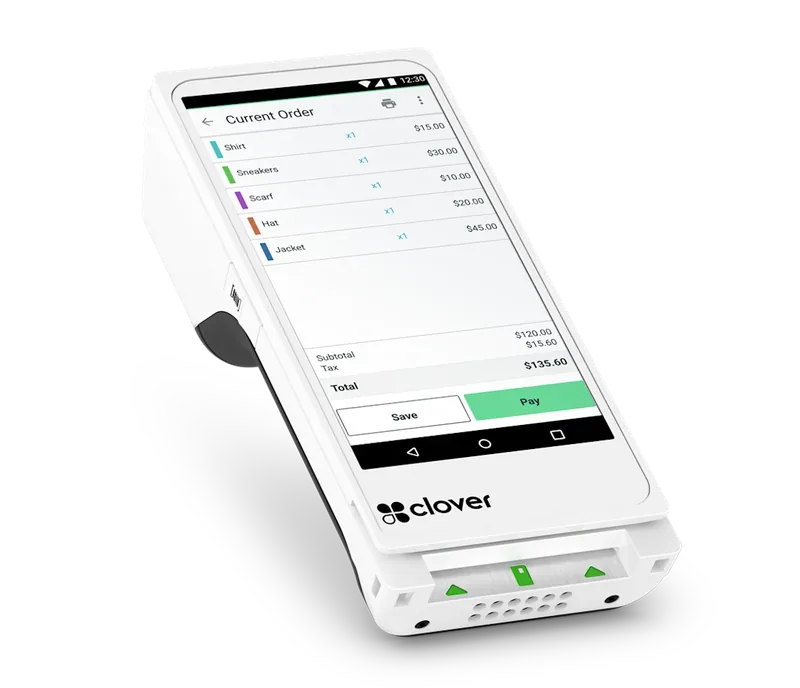
Merchant Fund Express offers the Clover Flex through our partnership. Our team handles delivery, installation and training, so it works the way your business does from day one.
The Flex is for businesses that bring checkout to the customer. It also makes a great second device at a restaurant to speed up the floor.
Servers take orders and payment at the table, which cuts walk-backs and wait times.
Collect payment at the door or the car window with a printed receipt.
Quote, charge and receipt on the job site without a laptop.
LTE keeps you selling at venues with unreliable Wi-Fi.
If you only ever take payment at a fixed counter, a Station or Mini is a better value. If you do not need a printer, look at the lighter Flex Pocket.
A short call about your counter, kitchen or route, your volume and how your customers pay.
We price equipment and processing for your business. No published price list, no pressure.
Hardware arrives configured. Our team comes on site for network, menu, printers and training.
We stay on the line on launch day and after. Support is a phone call away.
| Feature | Detail |
|---|---|
| Display | 6-inch touchscreen |
| Printer | Built-in receipt printer |
| Scanning | Camera and barcode scanner |
| Connectivity | Wi-Fi and 4G LTE cellular |
| Payments | NFC contactless, EMV chip and magnetic swipe |
| Power | Long-lasting battery |
| Build | Drop-resistant design |
| Software | Full Clover software suite |
Details are as listed for the device we install. We confirm the exact configuration, including anything marked to confirm, when we quote your setup.
The handheld comes off its charger at the start of the shift and the employee logs in.
A server, driver or technician enters the order or the job at the table, the car window or the door.
The customer taps, dips or swipes right there and the receipt prints from the built-in printer or goes by text or email.
Sales appear on the same account as the counter, and the handheld goes back on its charger at close.
The Flex has both Wi-Fi and 4G LTE, so it works across a dining room, a parking lot or a customer's driveway without depending on a venue network. A device with its own cellular connection is the usual answer to the question of what happens at a market or a job site where the Wi-Fi is weak or absent.
The Flex accepts contactless tap, including phone and watch wallets, along with EMV chip and magnetic swipe. A built-in printer means a customer can still get a paper receipt on the spot, which matters at tables, deliveries and curbside pickups.
The Flex has a camera and a barcode scanner built in, so scanning does not need an extra device. Charging docks, cases and straps make a fleet of handhelds practical for a restaurant floor, and we help you plan where they live between uses.
Against the Flex Pocket, the Flex adds a built-in printer and a barcode scanner; against the Station systems, it trades screen size for portability. It is a good second device at a restaurant, where it works the tables while a Station holds down the counter.
Card data is protected end to end: it is encrypted at the device and replaced by tokens, so the numbers a thief would need are never sitting on your counter or in your files. Meeting PCI standards is a shared job, and the part that is yours is individual logins and a few habits we walk you through.
A lost connection does not have to stop a sale. Clover supports offline payment acceptance for a limited time and processes the stored transactions when service is restored; we explain the limits and set a backup connection plan when we install.
Most installations in the Dallas-Fort Worth area are completed within 24 to 48 hours of approval, and nationwide deployments typically go live within 5 to 7 business days.
A conversation about your counter, your busiest hour and your current processing sets the scope.
We price equipment and processing for your business and start the merchant account application, including underwriting.
Devices are set up with your account and options in advance, then sent to you with free shipping.
An installer comes to you to place devices, program your menu, test every payment type and train the people who will use it.
We stay available through your first real service and afterward by phone, so a question on a busy night has an answer.
Merchant Fund Express is the team behind your terminal: we install on site, train your staff and answer the phone after launch. When you want funding or equipment financing, it is available from the same company.
Yes. It supports 4G LTE cellular in addition to Wi-Fi, so you can keep taking payment away from your own network.
At Merchant Fund Express, no. Equipment and processing are quoted to your business, because the right setup depends on how many stations you need, your sales volume and your card mix. Call (305) 384-8391 and we will put a personal quote together.
Our team handles delivery, setup, network configuration, menu or item programming and staff training, and stays available on launch day. Installation is done on site, and we will travel to you.
Yes. Send or read us a recent processing statement when you call and we will walk through what you are paying today and where a Clover setup could save you money.
Yes. The Flex shares the same account and menu as your other Clover devices, so sales appear in the same reports and on the same account.
The Flex has a long-lasting battery designed for a shift; we advise on how many handhelds and chargers a floor needs for your hours.
Yes, for many mobile businesses. Food trucks, delivery services and field technicians often use only handhelds.
The Flex prints receipts. For kitchen tickets, orders are routed to a kitchen printer or display, which we set up with the handheld.
Call Merchant Fund Express. We install it, train your staff and stay on the line after launch. Ask for a free rate review while you are at it.
