Clover hardware
The Clover Mini is the compact option for counters where space is tight. It runs the same Clover software as the larger systems and is easy to place, move and manage.
✓ Installed by our team and supported by phone. Rates and equipment are quoted to your business.
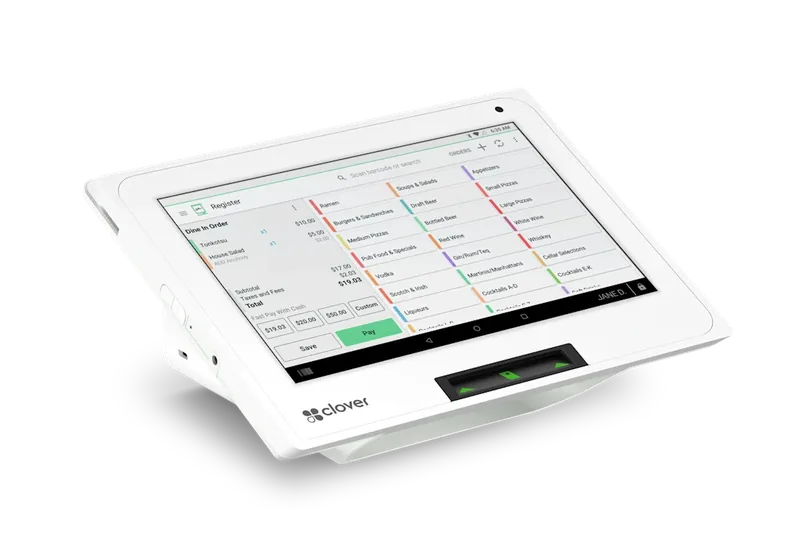
Merchant Fund Express offers the Clover Mini through our partnership. Our team handles delivery, installation and training, so it works the way your business does from day one.
The Mini is for owners who want a real POS without giving up counter space: a coffee window, a salon front desk, a small shop or a kiosk-style station.
A small footprint at the window or register with fast item buttons.
Take payment, add tips and track who did the service.
Barcode scanning and inventory tools without a bulky stand.
Add a payment point at an event table, a patio or a back counter.
For heavy ticket volume or a customer-facing display, look at the Station Duo. For tableside or delivery payments, a handheld Flex is the better partner.
A short call about your counter, kitchen or route, your volume and how your customers pay.
We price equipment and processing for your business. No published price list, no pressure.
Hardware arrives configured. Our team comes on site for network, menu, printers and training.
We stay on the line on launch day and after. Support is a phone call away.
| Feature | Detail |
|---|---|
| Form | Compact countertop terminal |
| Software | Full Clover software suite and App Marketplace |
| Accessories | Pairs with receipt and kitchen printers and a cash drawer we install for you |
| Payments | Ask us to confirm the payment types and tap acceptance for your configuration |
| Connectivity | Ask us to confirm Wi-Fi, Ethernet and cellular options for your configuration |
| Best use | Small counters, second stations and service desks |
Details are as listed for the device we install. We confirm the exact configuration, including anything marked to confirm, when we quote your setup.
The terminal is powered on at a small counter or desk and the first employee logs in.
Items and services are entered on a compact screen with the same buttons and modifiers as the bigger systems.
Payment is taken with the payment types confirmed for your configuration, with a receipt from the connected printer or by email or text.
Reports and tips are read on the device and the drawer, if you have one, is reconciled.
Connectivity on the Mini depends on the configuration we quote, so we confirm Wi-Fi, Ethernet and any cellular option when we scope your counter. Wherever the connection comes from, Clover can accept payments in offline mode for a limited time if service drops and sends them when it returns.
The accepted payment types depend on the Mini configuration. We confirm tap, chip and swipe acceptance for the setup we quote, rather than assuming, so there are no surprises for a customer holding a phone at the counter.
The Mini is the device most often paired with accessories: a receipt printer, a cash drawer, a barcode scanner or a kitchen printer. We select them to fit a small footprint and test them together.
The Mini is smaller and simpler than the Stations and lighter on counter space; the Stations add larger screens and a built-in printer, and the Duo adds a customer-facing display. The Flex is the better partner when you also need to take payment away from the counter.
Clover is built around end-to-end encryption and tokenization, designed to meet PCI DSS standards, so the sensitive part of every payment is handled for you. What stays with you is practical: keep staff on their own logins, never write a card number down and complete the yearly questionnaire.
Outages happen. For a limited time Clover can accept payments without a connection, hold them securely and process them automatically once service returns, and we plan a backup connection with you so offline mode is the exception and not the plan.
From approval to a live system, we plan on 24 to 48 hours in the DFW metro and 5 to 7 business days nationwide.
Tell us what a busy hour looks like, who is working it and what customers use to pay, and we shape the setup around that.
A personal quote comes first. When you say go, the application is submitted and underwritten for your type of business.
Devices are set up with your account and options in advance, then sent to you with free shipping.
An installer comes to you to place devices, program your menu, test every payment type and train the people who will use it.
You are not left alone on day one: support is a phone call away, with bilingual help available.
What you get from Merchant Fund Express is a team, not a box: installation at your location, practical training and phone support, plus funding options from the same company if your plans grow.
At Merchant Fund Express, the Mini is smaller and simpler. The Stations offer larger screens, a built-in printer on every model and, on the Duo, a customer-facing display. We help you pick based on volume and counter space.
No. Equipment and processing are quoted to your business, because the right setup depends on how many stations you need, your sales volume and your card mix. Call (305) 384-8391 and we will put a personal quote together.
Our team handles delivery, setup, network configuration, menu or item programming and staff training, and stays available on launch day. Installation is done on site, and we will travel to you.
Yes. Send or read us a recent processing statement when you call and we will walk through what you are paying today and where a Clover setup could save you money.
Yes. It runs the same Clover software as the larger systems, with inventory, employees, reporting and the App Marketplace, in a compact form.
Yes. A cash drawer can be added, and we configure it to open on the right sale types.
Yes. Receipt and kitchen printers can be connected, and we set up item routing for kitchens.
Ask us to confirm tap acceptance, connectivity and accessories for your configuration. We spell it out in your quote.
Call Merchant Fund Express. We install it, train your staff and stay on the line after launch. Ask for a free rate review while you are at it.
